Linux Mint
|
From freedom came elegance
| |
 i i
| |
|
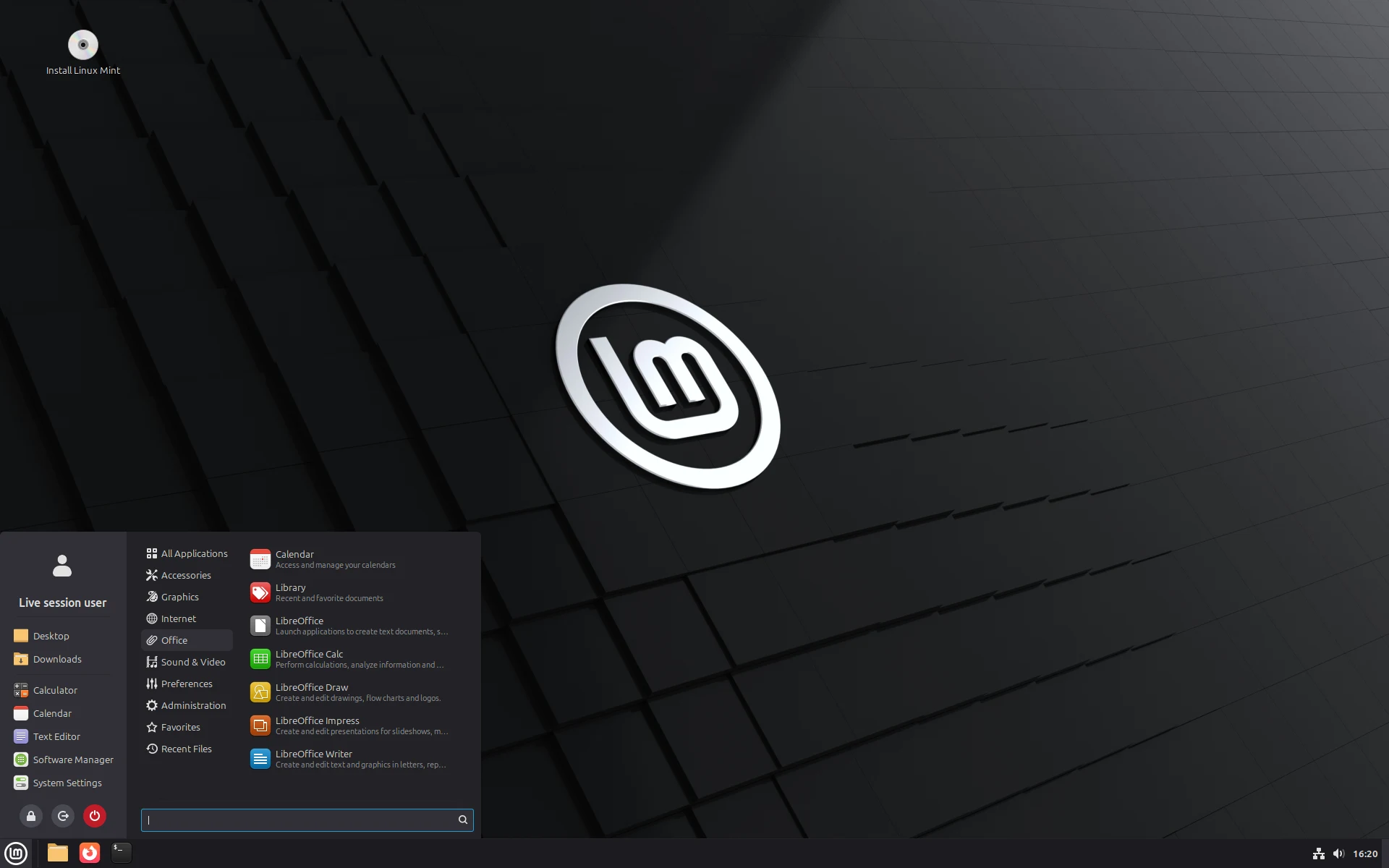
Linux Mint 22.3 running the Cinnamon desktop
A live session, with the application menu open
| |
| Developer | The Linux Mint team, led by Clément Lefèbvre |
|---|---|
| First release | 2006.08.27 (version 1.0, "Ada") |
| Latest release | 22.3 "Zena" (2026.01.13) |
| Debian edition | LMDE 7 "Gigi" (2025.10.14) |
| Package base | Ubuntu 24.04 LTS |
| Editions | Cinnamon, MATE, Xfce |
| Default desktop | Cinnamon 6.6 |
| Kernel | Linux 6.14, or 7.0 on the hardware enablement images |
| Package management | APT and dpkg, with Flatpak alongside |
| Architecture | x86-64 |
| Supported until | April 2029 (the 22 series) |
| License | GPL and other free software licenses |
| Source code | github.com/linuxmint |
| Website | linuxmint.com |














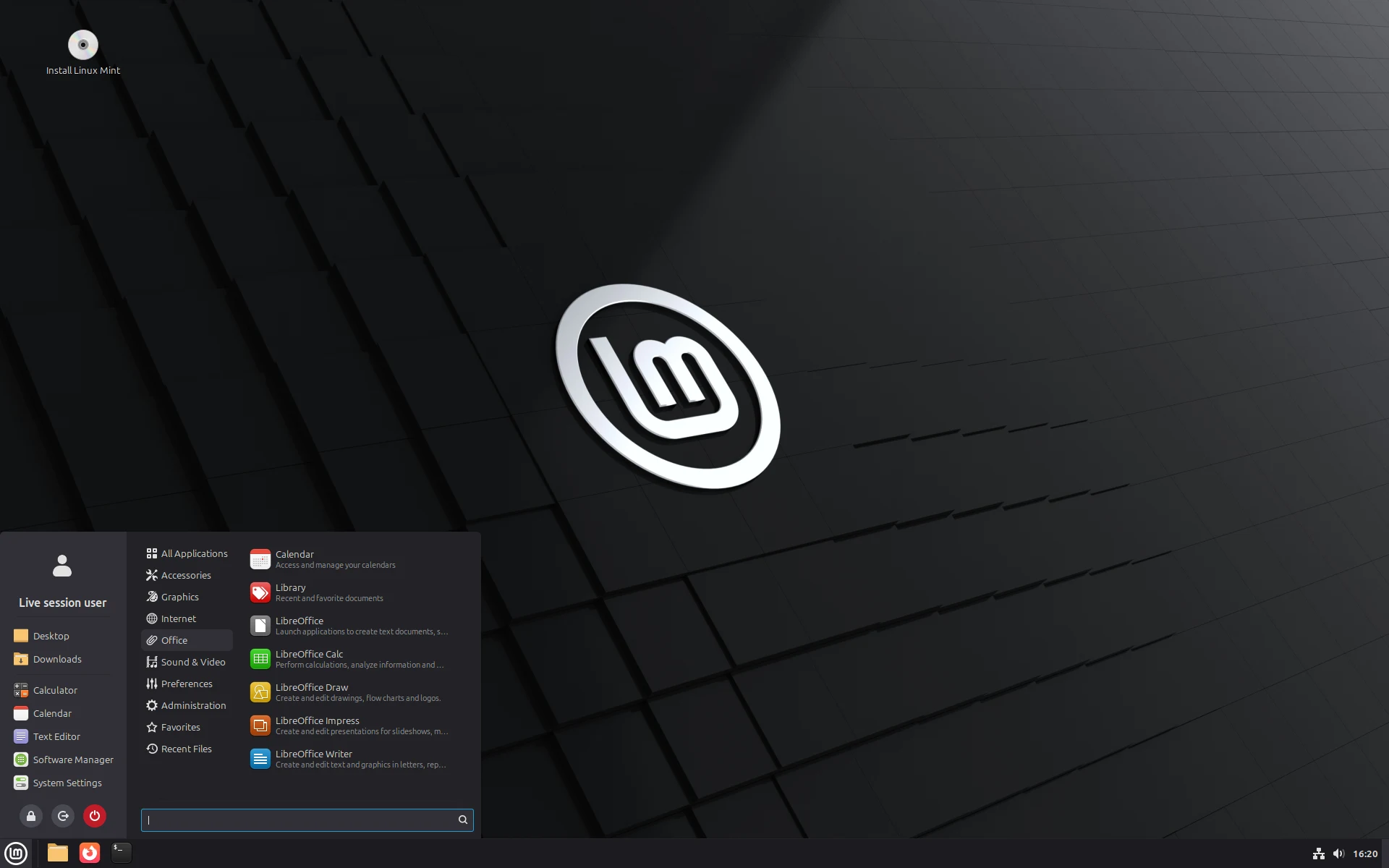

Linux Mint is a Linux distribution for desktop and laptop computers, assembled from Ubuntu packages by a small team led by Clément Lefèbvre. The project aims at a system usable the moment installation finishes, so its images carry an office suite, a media player and the codecs that other distributions leave out. Its own desktop environment, Cinnamon, keeps the panel, the application menu and the window controls that someone arriving from Windows already knows.
Each version is built on an Ubuntu release with long-term support, a base that changes every two years and receives security updates for five. The current version, 22.3 "Zena", was published on 2026.01.13 and will be updated until April 2029. Three editions are released together and differ only in the desktop: Cinnamon, MATE and Xfce. A separate line called Linux Mint Debian Edition drops the Ubuntu layer and builds on Debian instead.
The project takes no venture funding and sells nothing, living on donations, corporate sponsorships and a monthly patron program. It collects no data from the machines that run it, a position stated plainly on its own front page. Development happens in public repositories, and the next version is due at Christmas 2026.
1 History✎
1.1 The first releases✎
Version 1.0, "Ada", appeared on 2006.08.27 as a single image built on Kubuntu, and almost nobody noticed it. Version 2.0, "Barbara", followed that November on an Ubuntu base with the GNOME desktop, and it set the pattern the project still follows. Every release carries a woman's name ending in the letter a, and the names advance through the alphabet in order.
Growth came from a decision that looks minor in retrospect. Mint shipped the media codecs and the proprietary graphics drivers that Ubuntu deliberately withheld, so a new machine played video and drove its hardware without a search through support forums. Licensing rules eventually pushed the codecs out of the default image, and the installer now offers them as a single checkbox instead.
1.2 Cinnamon✎
GNOME 3 arrived in 2011 with a redesigned shell that removed the taskbar and the traditional application menu, and the change divided its users. Mint's first response, shipped in version 12, was a set of extensions that restored the familiar pieces on top of the new shell. Those extensions became a fork within months, and Cinnamon was released as a desktop in its own right in January 2012.
Version 13 made Cinnamon the default in May 2012, and the same release offered a MATE edition built on a separate continuation of the old GNOME 2 code. Both desktops have been maintained ever since, one inside the project and one alongside it. Cinnamon is written mostly in JavaScript, C and Python, and other distributions package it as an alternative desktop.
1.3 An Ubuntu LTS base✎
Version 17, released in 2014, ended the practice of following every six-month Ubuntu release. The package base now changes only when a new Ubuntu version with long-term support appears, and the numbered updates in between deliver newer Mint software onto the same foundation. That arrangement trades the newest packages for a system that does not shift underneath the user twice a year.
Version 20 dropped 32-bit images in 2020, following Ubuntu's own decision. The same release configured APT to refuse the automatic installation of snapd, after Ubuntu began quietly answering some package requests with its Snap format. A user who wants snapd can still install it deliberately, which is the distinction the project drew at the time.
1.4 The 2016 breach✎
On 2016.02.20 intruders reached the project's website and pointed the download links at a modified image of version 17.3 with the Cinnamon desktop. The replacement carried a backdoor that reported to a remote server, and the same intrusion copied the forum database with its user names, addresses and password hashes. The team took the site down within hours, rebuilt it and warned anyone who had downloaded that day to check their copy.
The episode made verification a standing part of the download instructions rather than a footnote. Every image is published with a signed checksum file, and the installation guide walks through comparing the two before the file is written to a disk.
1.5 Recent releases✎
Version 22, "Wilma", arrived on 2024.07.25 on the Ubuntu 24.04 base that the whole series shares. The point releases that followed added a fingerprint authentication tool, a rebuilt Software Manager, and a Cinnamon menu that can be reorganized by the user. Names in the series ran to the end of the alphabet with Zena, so the next version starts the sequence again under the working name Alfa.
That next version, 23, is due at Christmas 2026 on the Ubuntu 26.04 base, and it marks a longer development cycle than the project has used before. Its headline work is Wayland support in Cinnamon, which reached parity with the older X11 session during 2026, and a new installer taken from the Debian edition. Hardware enablement images for 22.3, published in July 2026, already carry the Linux 7.0 kernel for recent machines.
| Release | Date | Notable changes |
|---|---|---|
| 22 "Wilma" | 2024.07.25 | First release on Ubuntu 24.04; supported until April 2029 |
| 22.1 "Xia" | 2025.01.16 | Refreshed Mint-Y theme with selectable accent colors |
| 22.2 "Zara" | 2025.09.04 | Fingwit fingerprint tool; redesigned Software Manager |
| 22.3 "Zena" | 2026.01.13 | Cinnamon 6.6; reorganizable menu; System Information tool |
| LMDE 7 "Gigi" | 2025.10.14 | Debian 13 base for the Debian edition |
| 23 "Alfa" | December 2026 (planned) | Ubuntu 26.04 base; Wayland session; new installer |
2 Editions✎
The three main editions share every package except the desktop, so the choice is a matter of taste and of how old the machine is. Cinnamon is the flagship and receives the project's own development work. MATE offers the layout of GNOME 2 for people who prefer it, and Xfce asks the least of the hardware.
Linux Mint Debian Edition sits apart from all three. It replaces the Ubuntu base with Debian stable, ships only Cinnamon and exists partly as insurance, so that the project could continue if Ubuntu ever became unusable as a foundation. LMDE 7, "Gigi", moved to Debian 13 in October 2025 and is published for 64-bit machines only.
3 The Cinnamon desktop✎
Cinnamon presents a single panel across the bottom of the screen, a menu in the corner and a window list beside it, which is the arrangement most desktop users already expect. Nemo is its file manager, and the settings are gathered into one window rather than scattered across separate tools. Applets on the panel, desklets on the desktop and downloadable themes let the layout be rearranged without editing configuration files.
The default theme, Mint-Y, was reworked in 2025 with cooler tones and a set of accent colors the user picks during setup. Version 22.3 added a menu whose sidebar can be reorganized, an on-screen keyboard, and a System Information tool reporting on USB devices, graphics acceleration and firmware settings. The Wayland session, experimental for several years, is treated as finished work for the release due at the end of 2026.
4 Software made by the project✎
A substantial part of what distinguishes the distribution is written by the team itself, mostly in Python and mostly small. Several of these tools began as X-Apps, forks of GNOME programs kept deliberately independent of any one desktop so that Cinnamon, MATE and Xfce can all use them.
| Tool | What it does |
|---|---|
| Update Manager | Presents available updates, including kernel series, and applies them |
| Software Manager | Installs system packages and Flatpak applications from one list |
| Driver Manager | Offers proprietary drivers for graphics cards and other hardware |
| Timeshift | Takes system snapshots so a bad update can be rolled back |
| Warpinator | Sends files between machines on the same network, without a server |
| Hypnotix | Plays internet television streams from public channel lists |
| Sticky | Keeps notes on the desktop, with an Android companion application |
| Webapp Manager | Turns a website into an application with its own window and icon |
| Fingwit | Sets up fingerprint login for the screensaver and administrative tools |
| Nemo | The Cinnamon file manager, with pausable file operations |
| xed, xreader, xviewer, Pix | Text editor, document reader, image viewer and photo organizer |
5 Installing software✎
Packages come from the Ubuntu archives and from the project's own repository, and APT handles the work underneath whatever interface is used. The Software Manager puts system packages and Flatpak applications from Flathub in the same catalog, marking which is which, because the two differ in size and in how they are updated. Flatpak suits a program that needs to be newer than the base allows, since it carries its own libraries rather than relying on the system.
Snap packages are the exception. The system does not install snapd, and APT is configured to refuse any package that would pull it in without being asked, an arrangement in place since 2020. Someone who wants the format can remove that block in one command, which the documentation explains rather than discourages.
6 Release model and support✎
A major version appears when a new Ubuntu release with long-term support does, roughly every two years, and it inherits that release's support window. Point releases within the series update the desktop and the project's own applications while leaving the package base alone. Version 22 is supported until April 2029, and the whole 22 series shares that date.
The default kernel stays fixed for the life of a series, which keeps a working installation predictable but leaves very recent hardware unsupported. Hardware enablement images fill that gap by carrying a newer kernel, and the Update Manager can move an installation between kernel series without a reinstall.
7 System requirements✎
The stated minimum is 2 GB of memory, with 4 GB recommended for comfortable use, and the system itself occupies roughly 15 GB once installed. The download page asks for 20 GB of disk space, though a partition of 100 GB or more is suggested for a machine that will hold personal files. A display of 1024 by 768 is the smallest supported, and only 64-bit processors are supported at all.
8 Funding✎
Individual donations are the largest source of income, and the totals are published every month. In June 2026 the project received about $14,700 from 419 donors, alongside roughly $5,300 a month from 2,353 patrons on a subscription platform. Companies that host mirrors, ship the system on hardware or pay for advertising on the website make up the rest.
The arrangement leaves the project answerable to its users rather than to an owner, which is the argument it makes for keeping it. Nothing is sold, no telemetry is collected, and the code is published under free software licenses.